This document describes how to activate the shared use of sensors on your Bever Innvovations Smart devices. This procedure allows you to define which devices are data senders and which are data receivers.
Before you can activate sensor sharing, you must ensure that the devices are in a network and have been added to a group.
Configuring the sharing of sensors
Navigate to the group that contains the smart devices with which you want to share sensor data.
Open the group and select ‘Sensor sharing’.
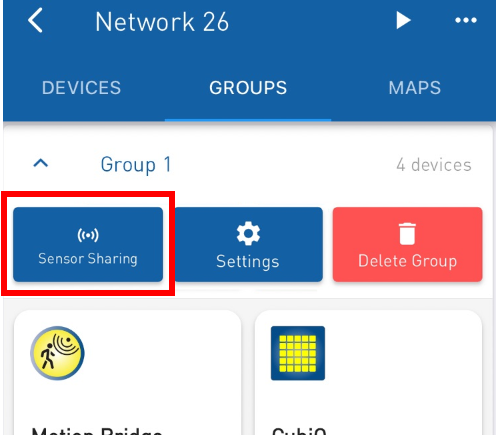
The window for sensor sharing opens.
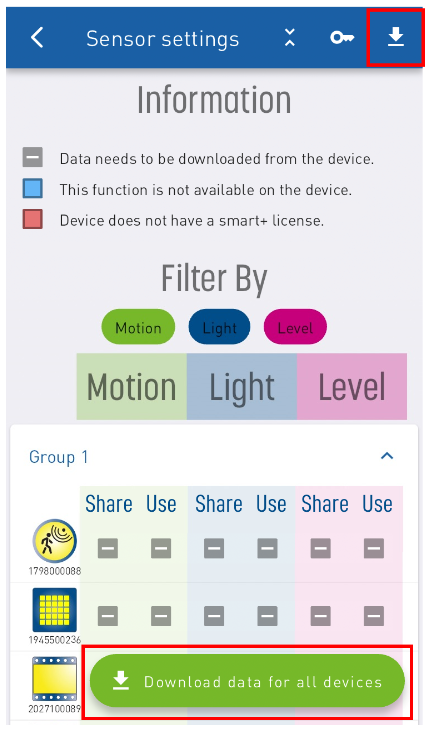
Here you will find an overview of all devices and can set whether they should share or use certain sensor information.
Click on the ‘Download data for all devices’ button at the top or bottom of the screen to obtain the current setting
NOTE
Do you have many devices in your group and only want to download the settings for one device? Tap and hold the device for which you want to download the data!
If your device is displayed in red, it does not have a Smart+ licence activated.
Please assign a licence to your Bever Innovations device.
Tick the checkboxes to enable or disable the shared information.
Once the box is ticked, the app will immediately enable (or disable) the selected option.
The complete setup process is also explained in this video
Was this article helpful?
That’s Great!
Thank you for your feedback
Sorry! We couldn't be helpful
Thank you for your feedback
Feedback sent
We appreciate your effort and will try to fix the article